Setting an access restriction for a section of the virtual classroom means that only students who meet the configured restriction (or sets of restrictions) will be able to view and access it.
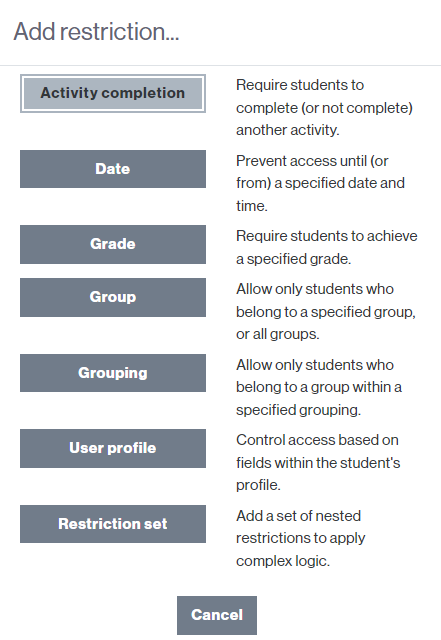
In the virtual classroom, you can configure the visibility and access to a section based on different criteria. You can restrict access by:
- Activity completion – If the classroom has any activity or resource configured with completion criteria, it requires the student to complete (or not complete) a previous activity/resource.
- Date – Prevents access until or after a specified date and time.
- Grade – Requires student to achieve a minimum specified grade.
- Group – Allows access only to students belonging to a specified group, or to all groups.
- Grouping Allows access only to students who belong to one of the groups of a specified grouping.
- User Profile – Controls access based on student profile fields.
You can also configure a Restriction Set.
For it:
- Activate the classroom edition.
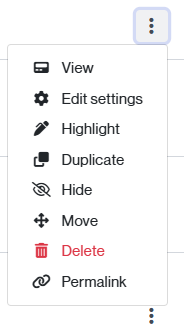
- Click the three points at the right side of the section and then Edit settings to edit them.
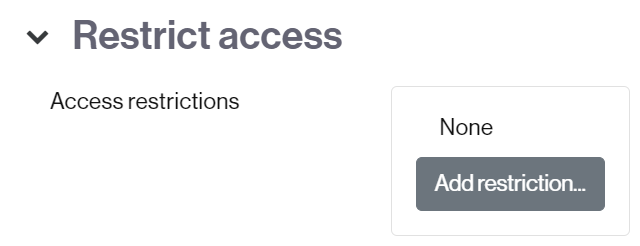
- Go to the Access restrictions section and click the Add a restriction… button to see the options.
- Choose the type of restriction that suits you best.
NOTE: You can select more than one option.
- click the Save Changes button to apply the restriction(s).