Deleted resources or activities can be recovered using the Recycle bin. These items are only recoverable during the 14 days from the date of elimination.
You should keep in mind that:
- The Recycle bin access is only available if any item has been deleted.
- Deleted items don’t appear instantly into the Recycle bin, it can take a few minutes.
To access:
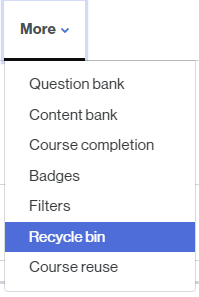
- From the classroom homepage, click on the More link. From the drop-down menu, select Recycle Bin.
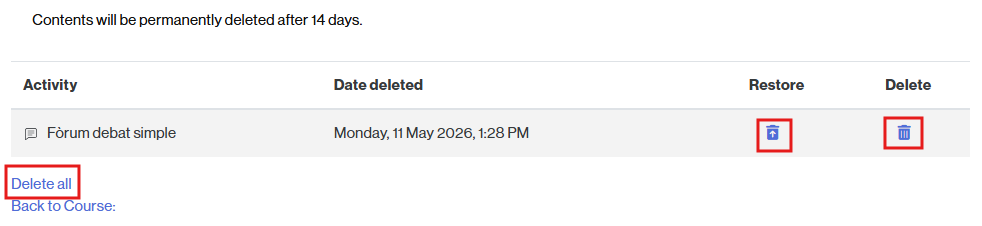
- Find the activity or resource you want to recover and click the icon that appears in the Restore column.
Other options
From the Recycle Bin you can also:
- Permanently delete the activity/resource (by clicking the Recycle Bin icon in the Delete column) – in this case, it will be permanently deleted, along with any user data registered for the activity or resource.
- Permanently delete all the contents of the Recycle Bin (by clicking the Delete all link).