Forums (whether the Announcements forum or any other forum created in the classroom) are an excellent tool for communicating with students.
When communicating with students via forums, you can set messages to:
- Be posted and emailed after a 30-minute delay—during this time, you can edit the notice.
- Be posted and sent immediately (with no waiting period).
- Be posted and sent according to a schedule, at the time of your choice.
How to schedule a forum message
- Go to the forum where you wish to post the information.
- Write the message you want to send to the students (How to post a news item).
- Click the Advanced link to view additional message-sending options.

- In the Display period section:
- Check the Enable box under Display start.
- Select the date and time when the message will be sent and posted in the classroom.
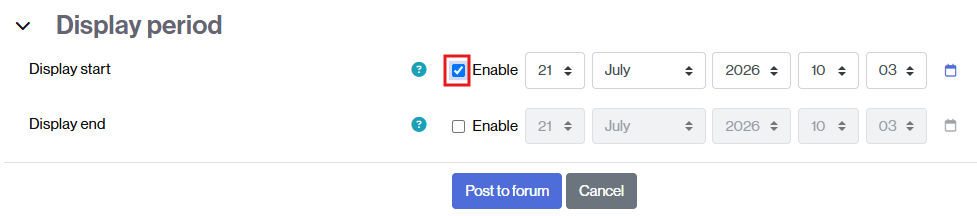
- Click the Post to forum button to save the message and its settings.
- While the message is not yet visible, it will appear in gray in the message list, labeled as Timed.
