Text and multimedia areas (formerly known as labels) are a versatile Moodle resource, as they allow for the inclusion of text, images, videos, and interactive content that is displayed directly within the course page (in the central column), without the need for any additional clicks. For this reason, they can be used, for example, to introduce section headings.
- See the entry How to add an activity or a resource.
- Look for Text and media Area.
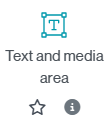
- You will find different fields to fill out and different options you can configure:
-
- Title in course index – Internal name or title for the text and multimedia area, which will appear in the course index (in the left-hand column of the course) to improve accessibility..
- Text – Content (text or multimedia) that will be displayed on the main course page.
- Restrict access – If needed, you can set restrictions on how students can view your content.
- Completion Conditions – If needed, you can set completion conditions so that the content is displayed as completed.
- Send content change notification – Checking this will send a notification to those enrolled in the class.
-
- Once you’ve configured the text and media area, click Save and return to course.