Moodle classrooms are structured in columns:
- Content body (central space) – this is where you will find the classroom content, organized by sections and/or. It is possible that upon accessing the classroom, you will only see this space (with the course index and block drawer hidden).
- Course index (on the left) – opening the course index will give you an overview of the sections and content.
- Bloc drawer (on the right) – opening this will show you the blocs active in the classroom.
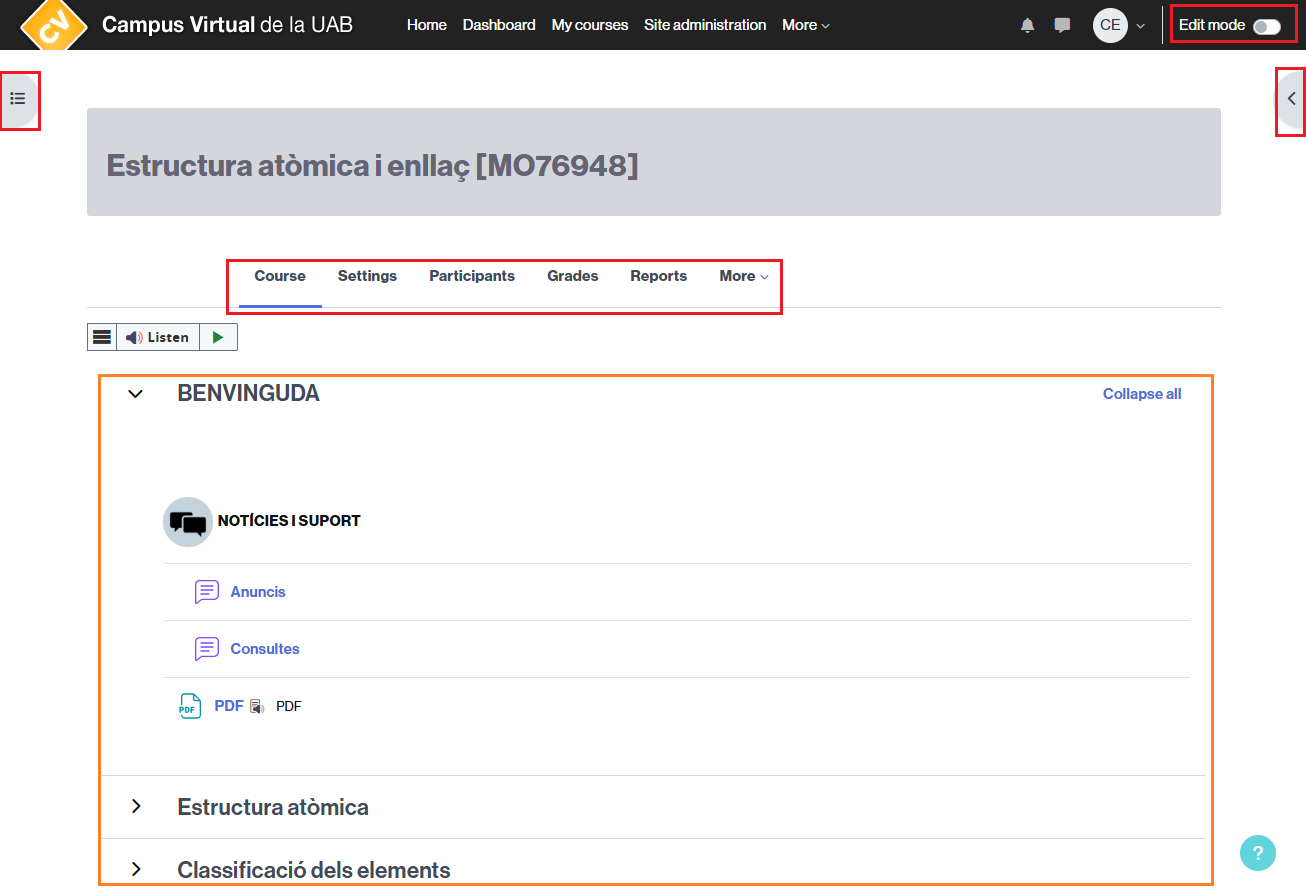
You can navigate through the different sections and access the various tools of the virtual classroom using the following menus:
- The navigation menu that appears under the course name.
- The secondary navigation menu, at the top, where you can quickly access All your courses.
- Access to the messaging of the virtual classroom and the user menu, in the upper right corner.
- The button to activate (or deactivate) classroom editing (only for teaching staff).
You will find all the information about navigating the virtual classroom at How can I navigate the virtual classroom?