The UAB Virtual Campus is the UAB’s virtual learning platform and can help you develop or complement your teaching and training.
On the Virtual Campus you will find:
- A panel for accessing and managing classrooms (as well as news and useful shortcuts).
- The virtual classrooms.
THE VIRTUAL CAMPUS DASHBOARD
The dashboard is the page you access once you have logged in with your NIU and password at https://cv.uab.cat (if you have already logged in with the other account).
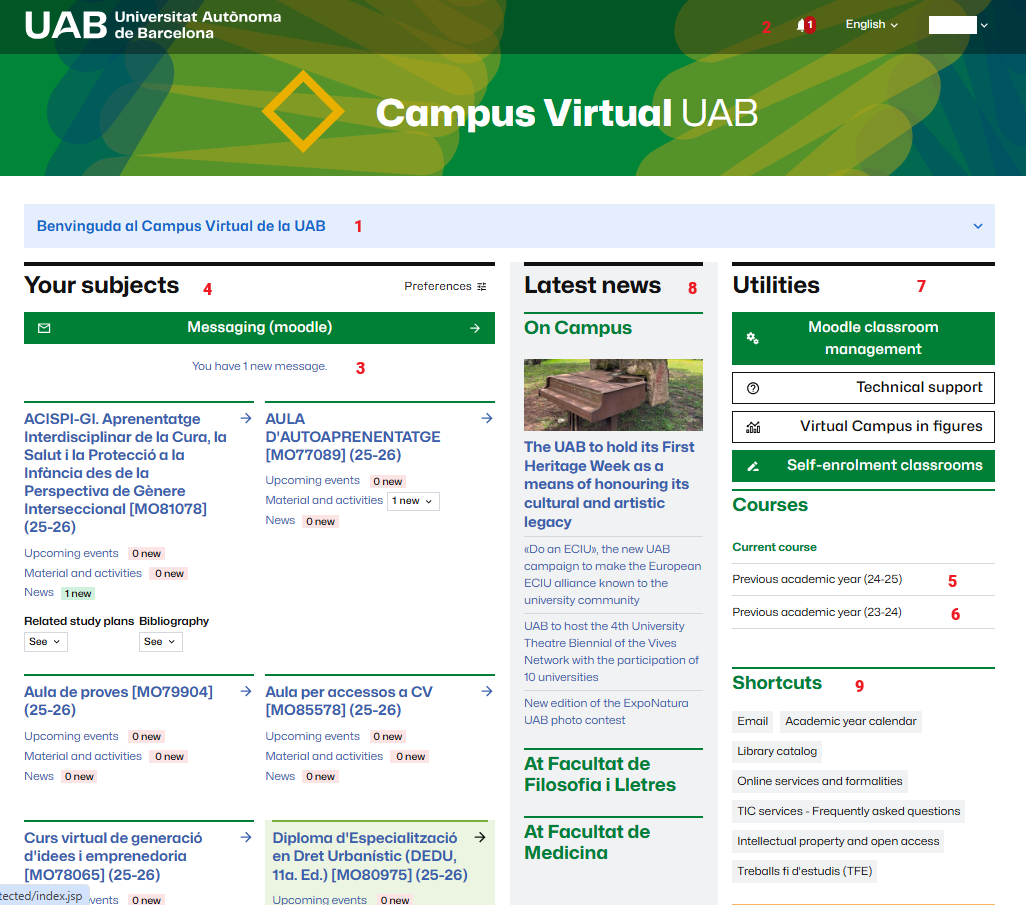
Some of the elements you will find are:
- Welcome message or important information affecting your CV (for example, scheduled events) (1).
- Notifications (2). We regularly publish notifications related to the Virtual Campus that may be of interest to you. You can check them whenever you wish.
- Classroom Messaging (3). Here you can quickly see if you have any messages in any of your virtual classrooms.
- Your subjects (4) or the list of virtual classrooms (subjects or courses) for the current academic year that you have access to.
- Access to the dashboard of previous courses (5 and 6), from where you can see the subjects you had access to and directly access the classroom.
- Access to classroom management (7) (only available to teachers with the editor role) and technical support. If there are self-enrollment classrooms available, you will also see them here.
- Current news at the UAB (8). You will see news related to the Campus and also to the center (where centers) where you have your courses.
- Access to useful shortcuts (9).
VIRTUAL CLASSROOMS
Virtual classrooms are independent spaces (associated with courses, training groups, or simply students and people who need access) on the Virtual Campus.
They are based on Moodle and allow you to:
- Create content.
- Structure and organize them according to the criteria you deem most appropriate.
- Evaluate your students.
- Communicate with your students.
You can see an example of a classroom at The virtual classroom. What I will find.