To navigate the classroom and access its various tools, there are several menus:
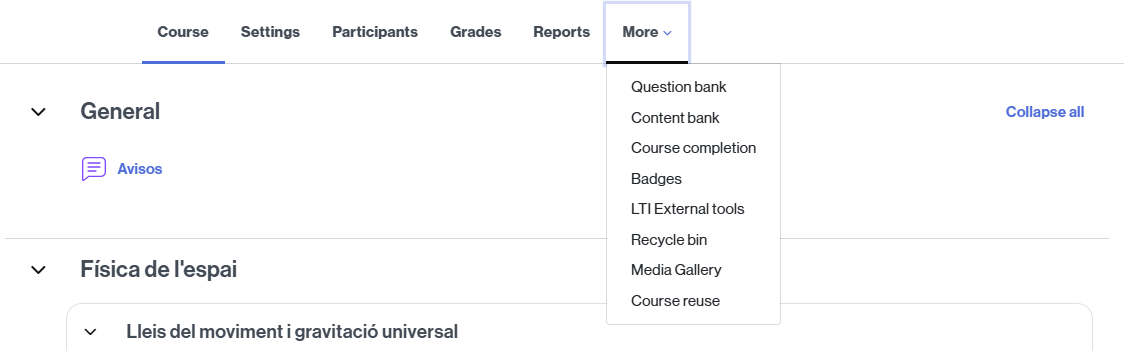
COURSE NAVIGATION MENU
- The navigation menu that appears under the course name, from which you can perform most of the most frequent tasks and actions in the classroom.
ACCESS TO COURSES
- The secondary navigation menu, located at the top, provides quick access to All your courses (your classrooms in the current academical year).

MESSAGING, NOTIFICATIONS, AND PERSONAL SETTINGS
- Access to the classroom messaging, the notifications and the user menu, in the upper right corner. In this menu you will find links to:
- Set your profile in the virtual classrooms.
- Access the Grades.
- Set the preferences (notifications, mailing…).
- Change the platform language (the language of the contents will not change).
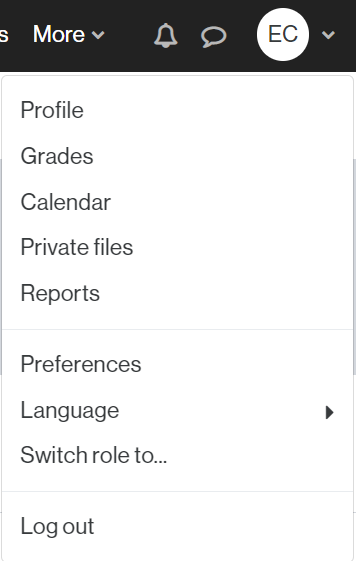
(View of the user menu of a person with a teaching role)
[Teacher Editor] CLASSROOM EDITING
- The button to activate (or deactivate) classroom editing (only for the teaching team), which will allow you to, among other things, create sections and content in the classroom.
